TNPSC Photo Compressor Online
Upload your photograph, enter your name and date, and generate a TNPSC-ready photo.
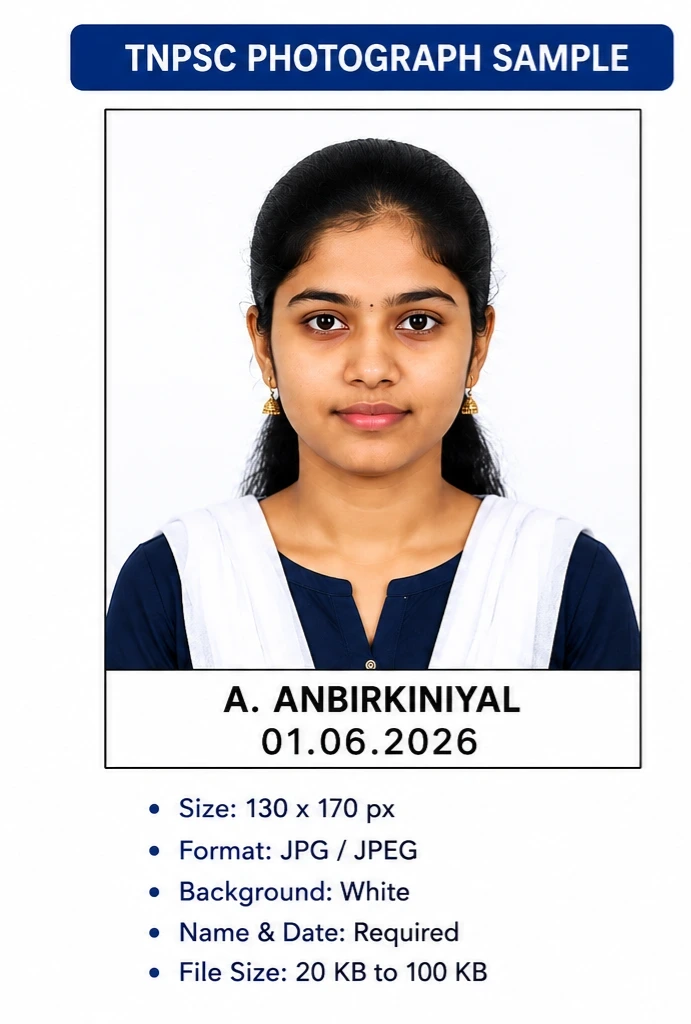
Below is a sample TNPSC-style photograph showing how the final output may appear after processing.
What is TNPSC Photo Compressor?
TNPSC Photo Compressor is a free online tool designed to help candidates prepare photographs according to Tamil Nadu Public Service Commission (TNPSC) application requirements. Many applicants face difficulties when uploading photographs because the image dimensions, file size, or formatting do not match the required specifications. This tool simplifies the process by automatically resizing and compressing photographs while maintaining image clarity.
With TNPSC IQ, candidates can upload their photograph, add their name and date, generate a properly formatted image, and download the final output within seconds. The tool works directly in your browser and does not require any software installation.
How to Use TNPSC Photo Compressor
Using the TNPSC Photo Compressor is simple and requires only a few steps:
- Upload your passport-size photograph.
- Enter your name exactly as required.
- Select the photograph date.
- Click the "Generate TNPSC Photo" button.
- Preview the generated image.
- Download the processed photograph.
- Upload the downloaded file during the TNPSC application process.
The tool automatically adjusts the image layout and places the name and date in the appropriate area for easy visibility.
Need to prepare your signature as well? Visit our TNPSC Signature Compressor Tool to resize and compress signature images.
TNPSC Photo Requirements
TNPSC examinations generally require candidates to upload a recent passport-size photograph that meets specific technical requirements. Although exact specifications may vary depending on the recruitment notification, applicants should typically ensure that:
- The photograph is clear and recent.
- The image is in JPG or JPEG format.
- The background is plain and light-colored.
- The candidate's face is clearly visible.
- The file size remains within the prescribed limit.
- The name and date are displayed clearly when required.
Candidates should always verify the latest official notification before submitting their application, as requirements may change from one recruitment cycle to another.
Benefits of Using TNPSC IQ
TNPSC IQ is built specifically for TNPSC aspirants and offers several advantages:
- Completely free to use.
- Works on mobile phones, tablets, and computers.
- No software installation required.
- Fast image processing.
- Simple user interface suitable for beginners.
- Helps reduce file size while maintaining quality.
- Allows easy addition of name and date.
- Instant preview before download.
The platform helps candidates save time and avoid unnecessary visits to browsing centers or photo editing services.
Common Upload Errors
Many TNPSC applicants encounter upload issues due to incorrect image formatting. Some of the most common mistakes include:
- Uploading photographs with incorrect dimensions.
- Exceeding the maximum file size limit.
- Using unsupported file formats.
- Uploading blurry or low-quality images.
- Incorrect placement of name and date.
- Using photographs with dark or distracting backgrounds.
- Submitting outdated photographs.
Using an image preparation tool before uploading can help reduce these errors and improve the chances of a successful submission.
Why Choose TNPSC IQ?
TNPSC IQ was created to simplify the technical side of the TNPSC application process. Instead of spending time learning image editing software, candidates can use straightforward online tools designed specifically for examination applications.
Our focus is on simplicity, accuracy, speed, and accessibility. Whether you are applying for Group 1, Group 2, Group 2A, Group 4, or other TNPSC examinations, TNPSC IQ provides practical solutions to help prepare photographs and signatures quickly.
About TNPSC IQWho Can Use This Tool?
This tool is useful for TNPSC Group 1, Group 2, Group 2A, Group 4, VAO, and other recruitment applicants who need properly formatted photographs for online applications.
Frequently Asked Questions
For additional questions and answers, visit our FAQ Page.
Is the TNPSC Photo Compressor free?
Yes. The tool is completely free for all TNPSC aspirants.
Do I need to install software?
No. Everything works directly through your web browser.
Can I use the tool on mobile devices?
Yes. The tool is fully compatible with smartphones and tablets.
Will the photograph quality be reduced?
The tool is designed to maintain good image quality while optimizing the file size.
Does the tool store my photographs?
The image is processed only for generating the required output. Please refer to the Privacy Policy page for complete information regarding data handling practices.
Disclaimer: TNPSC IQ is an independent utility platform and is not affiliated with the Tamil Nadu Public Service Commission (TNPSC). Candidates should always verify the latest official requirements through the official TNPSC notification before submitting their applications.
Always verify the latest TNPSC notification before submitting photographs or signatures. Requirements may change depending on the recruitment notification.